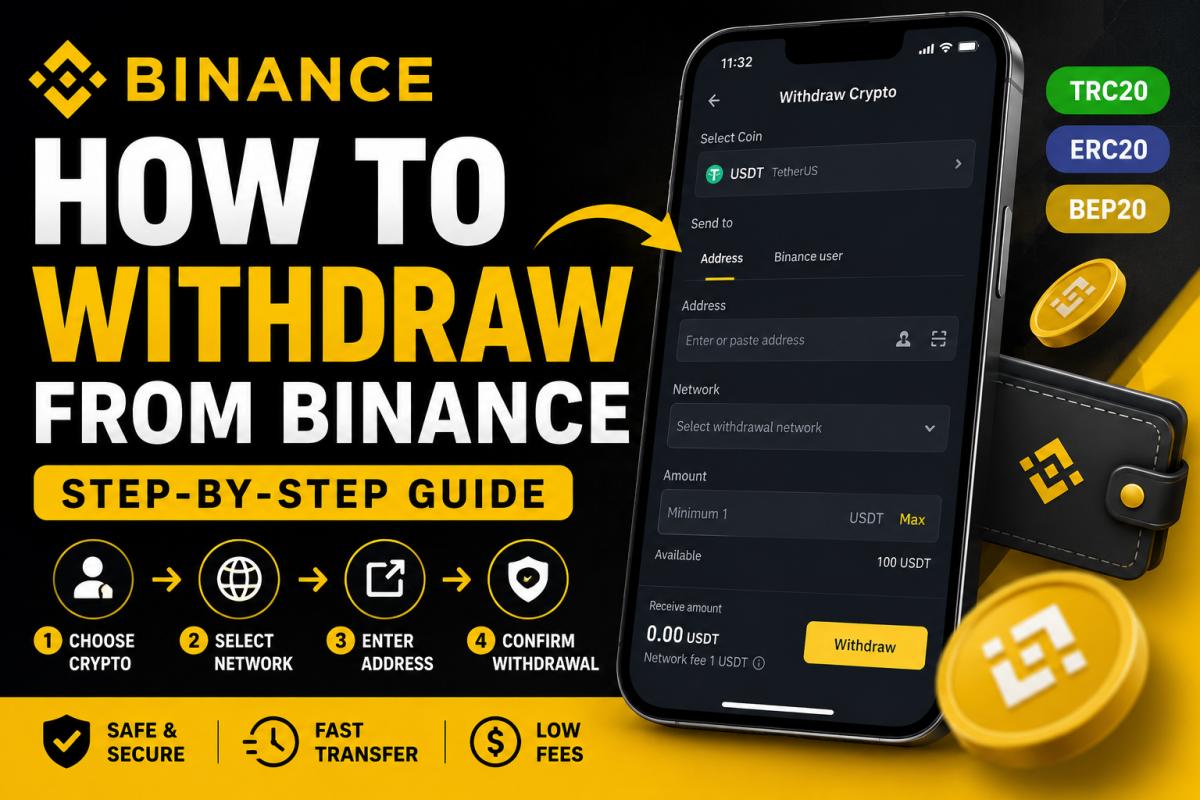
How to Withdraw from Binance (Step-by-Step Guide)
Withdrawing cryptocurrency from Binance is usually simple, but beginners often make mistakes when choosing networks, entering wallet addresses, or confirming transactions. In some cases, selecting the wrong blockchain can result in lost funds or unnecessary fees.
In this complete step-by-step guide, you’ll learn exactly how to withdraw crypto from Binance safely in 2026. We’ll cover wallet withdrawals, network selection, withdrawal fees, processing times, and common mistakes to avoid.
What You Need Before Withdrawing from Binance
Before starting a withdrawal, make sure you have:
- A verified Binance account
- The correct wallet address
- The correct blockchain network
- Two-factor authentication enabled
- Enough balance to cover withdrawal fees
👉 If you are new to the platform, read our Binance review.
Step 1 – Log In to Binance
Go to Binance and sign in to your account using your email address or mobile app.

Alt text: Binance dashboard interface
For security reasons, always make sure you are using the official Binance website and never enter your credentials on unknown pages.
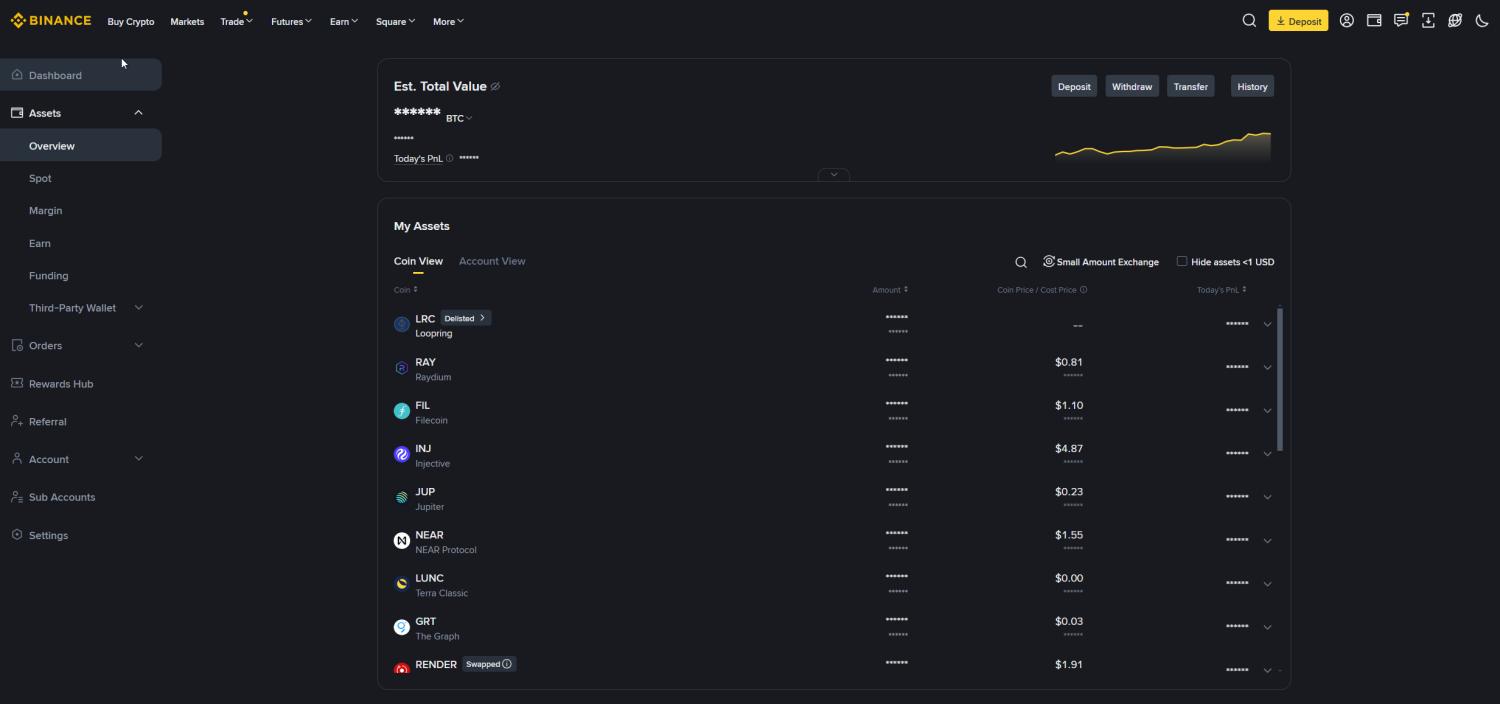
Step 2 – Open Your Wallet
After logging in, navigate to:
Wallet → Fiat and Spot
Here you will see all cryptocurrencies available in your account.
Step 3 – Click Withdraw
Find the cryptocurrency you want to withdraw and click the Withdraw button.
For example:
- Bitcoin (BTC)
- Ethereum (ETH)
- Tether (USDT)
- BNB
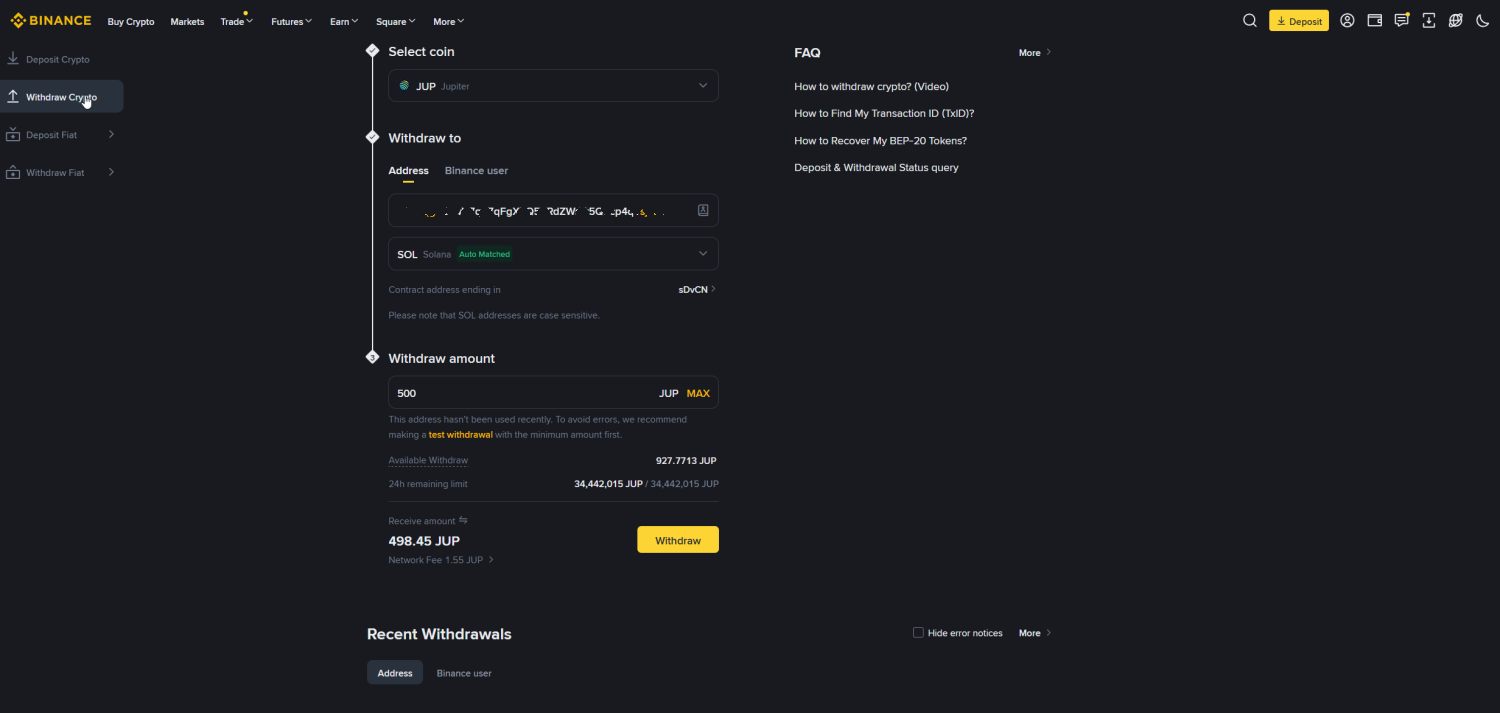
Step 4 – Enter Wallet Address
Paste the wallet address where you want to send your cryptocurrency.
This is the most important step.
If the address is incorrect, your funds may be permanently lost.
Always double-check:
- First characters
- Last characters
- Blockchain compatibility
Step 5 – Choose the Correct Network
Choosing the correct blockchain network is critical.
Binance usually offers multiple networks:
- ERC20 (Ethereum)
- TRC20 (Tron)
- BEP20 (BNB Smart Chain)
- Bitcoin Network
- Solana
The network must match the receiving wallet.
Example:
If your receiving wallet only supports ERC20 and you send funds using TRC20, the assets may not arrive.
Which Binance Network Is Cheapest?
Fees vary significantly depending on the network.
| Network | Typical Fee | Speed |
|---|---|---|
| ERC20 | High | Medium |
| TRC20 | Low | Fast |
| BEP20 | Very Low | Fast |
In most cases, TRC20 and BEP20 are significantly cheaper than ERC20.
Step 6 – Enter Withdrawal Amount
Type the amount you want to withdraw.
Binance will automatically display:
- Withdrawal fee
- Final amount received
- Minimum withdrawal amount
Step 7 – Confirm Withdrawal
After checking all details, click Withdraw.
Binance will ask for:
- Email verification
- 2FA code
- Security confirmation
How Long Do Binance Withdrawals Take?
Withdrawal times depend on the blockchain network.
| Network | Estimated Time |
|---|---|
| Bitcoin | 10–60 minutes |
| Ethereum | 5–30 minutes |
| TRC20 | 1–5 minutes |
Common Binance Withdrawal Mistakes
Many withdrawal problems happen because users rush through the process.
Common mistakes include:
- Using the wrong network
- Copying the wrong wallet address
- Sending unsupported tokens
- Ignoring withdrawal fees
- Withdrawing during network congestion
Taking a few extra seconds to verify details can prevent serious losses.
How to Reduce Binance Withdrawal Fees
If you withdraw frequently, reducing fees becomes very important.
Here are some practical tips:
- Use cheaper networks like TRC20 or BEP20
- Avoid ERC20 unless necessary
- Withdraw larger amounts less frequently
- Check network congestion before withdrawing
👉 Learn more in our Binance Fees Explained guide.
Is Binance Safe for Withdrawals?
Yes — Binance is considered one of the safest crypto exchanges globally.
The platform includes:
- 2FA security
- Withdrawal confirmations
- Anti-phishing tools
- Risk monitoring systems
However, user mistakes remain the biggest risk factor.
Binance Withdrawal Fees Explained
Withdrawal fees are dynamic and depend on blockchain conditions.
For example:
- Bitcoin fees increase during congestion
- Ethereum gas fees fluctuate heavily
- TRC20 fees usually remain low
Always check the current fee before confirming the withdrawal.
Final Verdict
Withdrawing crypto from Binance is relatively easy once you understand the process. The most important step is choosing the correct network and verifying wallet details carefully.
For most users, Binance remains one of the best exchanges for fast and secure cryptocurrency withdrawals.
FAQ – Binance Withdrawals
How do I withdraw crypto from Binance?
Open Wallet → Fiat and Spot → Withdraw, enter the wallet address, choose the network, and confirm the transaction.
How long do Binance withdrawals take?
It depends on the blockchain network. TRC20 withdrawals are usually much faster than Bitcoin or Ethereum.
What is the cheapest withdrawal network on Binance?
TRC20 and BEP20 are usually the cheapest options.
Can I cancel a Binance withdrawal?
Once the transaction is confirmed on the blockchain, it usually cannot be canceled.
Why is my Binance withdrawal pending?
This may happen because of network congestion, security checks, or blockchain confirmations.
What happens if I choose the wrong network?
Funds may be lost or require complicated recovery procedures.
Does Binance charge withdrawal fees?
Yes. Fees vary depending on the cryptocurrency and network.
Is Binance safe for withdrawals?
Yes, Binance uses multiple security systems including 2FA and withdrawal confirmations.
Can I withdraw fiat money from Binance?
Yes, depending on your country and available payment methods.
What is the minimum withdrawal amount?
The minimum amount depends on the cryptocurrency being withdrawn.